.shock Suite · tag
.tag.shock
Available now (v1)v2 — Early Access
AI stock photo keywording · 9-axis sales score · model release matching.
One Claude API call per image writes a commercial title, 50 ranked keywords and a scored submission queue — and automatically matches every face to a signed model release. Results in 10–30 seconds.
Free with your own Anthropic API key · runs in the browser · no install · paid plans available
Built by a photographer with 20+ years contributing to Shutterstock, Adobe Stock and Getty — and exactly the problem that needed solving.
The workflow
From folder to export in four steps.
Drop a shoot folder into .tag.shock. Face detection runs in parallel as images load. Open any photo, hit Generate — and within seconds the metadata panel fills with a title, 50 scored keywords, a commercial sales score, and the matched model releases for every face in frame. Export one image or a full folder for any agency.
Batch processing
Generate all — one pass across an entire shoot folder.
Microstock contributors don't keyword one image at a time. .tag.shock's Generate all button runs the full AI pipeline — title, description, 50 keywords, 9-axis score, release match — across every image in the folder in a single pass.
Prompt caching means the model system instructions are loaded once per session. Each subsequent image in the batch only costs tokens for that image — so a 200-image folder costs a fraction of 200 individual runs.
- Generate all from the toolbar — one click processes every image in the active folder sequentially, updating the gallery as results come in.
- Per-image cost with caching — prompt caching reduces per-image API cost to fractions of a cent after the first call. A 200-image batch typically costs under $1 in Anthropic API fees.
- Review and override — any generated metadata stays editable. Click any keyword, title or description to refine before export. Score re-grades in one call without re-generating everything.
- Export the whole folder — select all and export to any agency: one CSV per platform, shaped and ready to import directly.
Estimated batch cost — 200 JPEG folder
Estimates at current Claude Haiku pricing with prompt caching. Actual cost depends on image complexity and keyword count. Free local release matching has zero API cost.
Before .tag.shock — 200 images
~6 hours
200 images × ~90 seconds each of manual titling, keyword entry, category selection and CSV formatting per image
With .tag.shock — 200 images
~40 min + $0.60
AI generates all 200 in one unattended pass. You review, override any outliers, export per platform. Done — and you have a scored submission queue.
Three AI advantages in one tool
Beyond keywords — a complete commercial workflow.
Most stock photo keywording tools stop at tags. .tag.shock runs AI metadata generation, a 9-axis commercial sales score, and smart model release face-matching inside a single API call — every image, every time, in the same pass.
01 · AI Metadata Generation
Title, description and 50 ranked keywords — agency-ready in seconds.
Claude reads the image — subject, mood, lighting, composition, commercial context — and writes a title up to 150 characters, a platform description up to 200 characters, and a keyword cloud of up to 50 terms ranked by commercial weight. 4-tier keyword prioritisation, 26 agency categories auto-mapped, CSV and embedded XMP on export. Prompt caching keeps per-image cost to pennies.
02 · AI Sales Scoring
Know which frames to upload before the upload slot is spent.
Every image is scored across 9 axes of commercial salability — searchability, specificity, emotional resonance, trend alignment, market saturation, technical quality, authenticity, usability and licensing risk. The score comes back with the metadata in the same response, ranks your take priority-first, and can be re-run after an edit without re-generating the full metadata pipeline.
03 · Smart Model Release Matching
Every face — and every person from behind — matched to a signed release.
On-device face detection runs in parallel as your folder loads. Free mode uses local landmark models and CLIP embeddings at zero cost. AI mode sends face crops to Claude Vision for maximum accuracy — partial faces, challenging angles, occlusion, and person recognition from behind when the face isn't visible. Body shape, posture, hairstyle and clothing all factor into the match. Every clearance result attaches to the metadata and ships with the export CSV.
AI metadata generation
Title. Description. 50 ranked keywords. One call.
Point .tag.shock at any image — JPEG, TIFF, PNG, or RAW (NEF, ARW, CR3, DNG, RAF and all major formats) — and Claude analyses the frame for subject, mood, composition and commercial context. Back comes a title, a description, and a keyword cloud ranked from most- to least-commercial — with deduplication and relevance sort already applied.
Prompt caching means the model instructions are loaded once per session. You pay tokens only for the image itself on every subsequent call — batch a folder and the per-image cost drops to fractions of a cent.
- 4-tier keyword priority — primary terms first, supporting terms ranked behind. Agency search algorithms surface the right signals at the top of every submission.
- 26 submission categories — auto-mapped to agency taxonomies for Shutterstock, Adobe Stock, Getty, Alamy and Pond5. No hand-selecting category by category.
- Agency-specific export variants — column names, keyword count limits and category naming shaped per platform. Import directly; no manual reformatting.
- RAW format support — NEF (Nikon), ARW (Sony), CR3 (Canon), DNG, RAF (Fujifilm), ORF (Olympus) and all common RAW formats read natively. No pre-conversion needed.
- Embedded XMP in source files — metadata written directly into JPEG and TIFF for any platform that reads IPTC-IIM or XMP-dc. Sidecar XMP for RAW and all other formats.
- One API call — all outputs — title, description, keywords, categories, score and release status all return in a single structured response. Typically under 30 seconds.
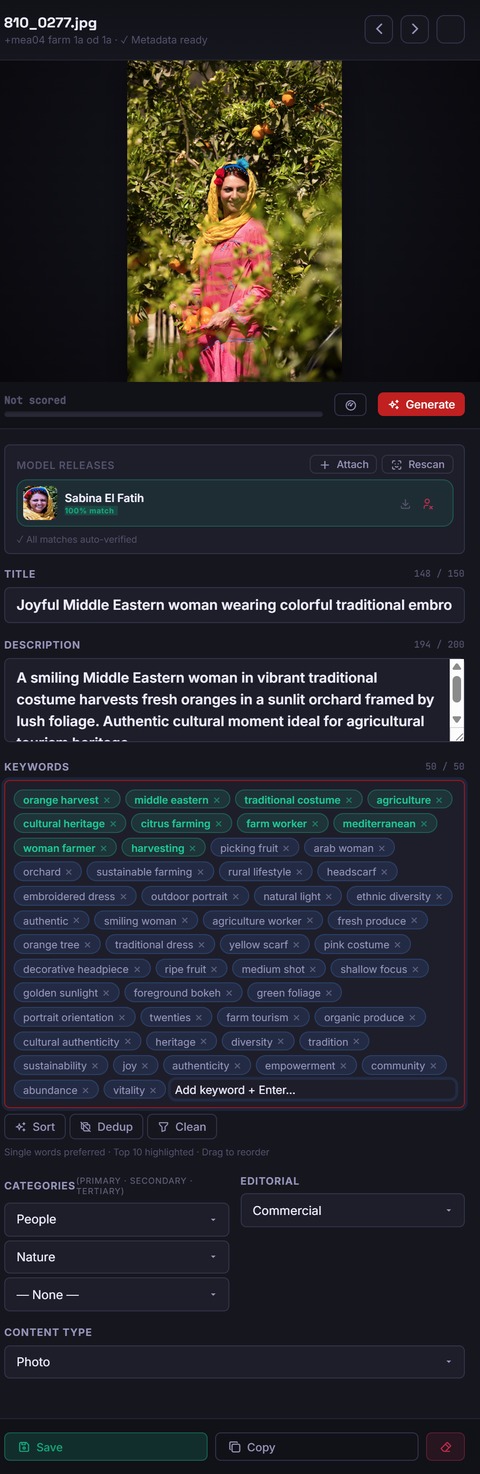
Example output
What .tag.shock writes for a lifestyle photograph.
The following is illustrative output generated by the real app for a citrus-grove lifestyle shoot. Your results will reflect your own image content.
Generated title
Young woman picking oranges in a sun-lit Mediterranean grove — lifestyle harvest
Generated description
Cheerful young woman in traditional clothing picking ripe oranges from a tree in a lush Mediterranean citrus grove during golden hour. Authentic lifestyle, warm tones, copy space right.
Categories auto-mapped
Overall commercial score
High authenticity + strong lifestyle demand + generous copy space. Priority submit to Shutterstock Lifestyle and Adobe Stock.
50 ranked keywords — 4-tier priority
Bright red = primary / secondary tier · grey = supporting / context tier
AI sales scoring
A commercial verdict before the upload slot is spent.
The score runs inside the same Generate call as metadata — no separate API request, no extra cost. Each image is rated across nine dimensions of commercial salability. The result is a ranked queue: upload in priority order and allocate slots to images most likely to sell. Scores below are from the citrus-grove example above. Bar colour: ■ strong (85+) ■ good (75–84) ■ moderate (<75)
Keyword depth and the breadth of search angles. How easily a buyer finds this frame when they type a brief into an agency search bar.
Does the image solve a recognisable buyer brief — advertising, editorial, lifestyle, food? High-relevance shots command higher licence fees because they're used immediately.
Mood, narrative clarity and viewer impact. Resonance correlates strongly with download velocity — designers choose images they feel, not just see.
Sharpness, exposure, noise level, colour rendering and compression. The baseline every agency reviewer checks before the image ever reaches buyer search results.
Real-world candour, diversity signal and unscripted feel. Stock agencies actively reward this in search placement — generic or over-produced imagery scores low regardless of technical quality.
How closely the image matches categories seeing active buyer demand — wellness, sustainability, diversity, food provenance. Trend shots sell faster and at stronger initial prices.
How many similar images already fill this slot. A high score signals differentiated supply — the image has room to rank early in buyer searches. A low score means heavy competition.
Copy space, negative space and compositional flexibility — how easily a designer drops this into an ad, article header or social card without the subject competing with text overlay.
Trademarks, recognisable faces without confirmed releases, copyrighted logos. A high score = low risk — this image is commercially clean. Flags that block clearance appear as warnings in the metadata panel.
The overall score is a submission priority rank — not a pass/fail. Re-grade any image after editing metadata or retouching; score refreshes in one call without re-running the keyword pipeline.
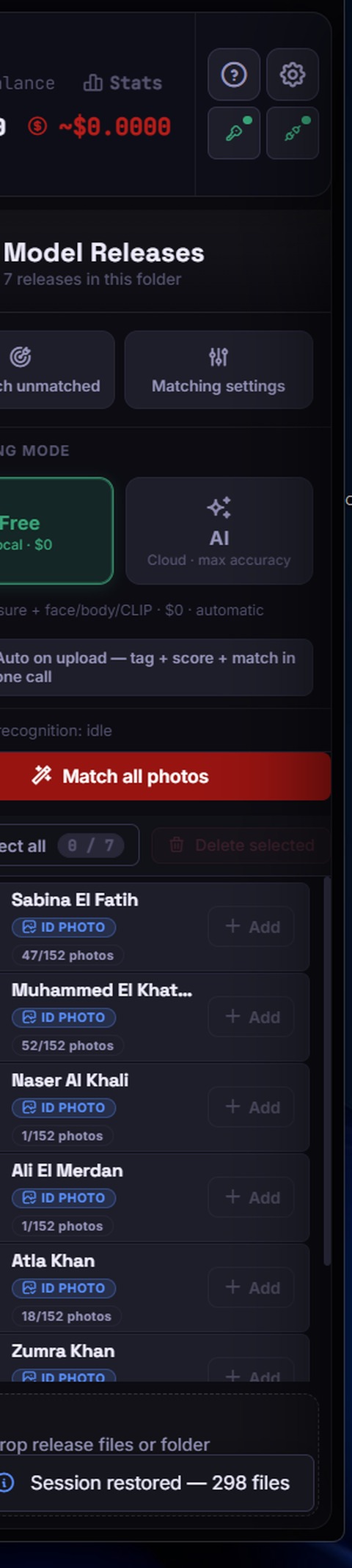
Smart model release matching
Every face in every frame matched to a signed release — automatically.
Commercial stock photography requires a signed model release behind every recognisable face. Tracking that manually — across hundreds of shots from a shoot day — is where files slip through, agencies reject, and earnings stall.
.tag.shock runs parallel face detection as your folder loads — no waiting, no trigger. By the time you open the first image, every face in the folder is already detected and queued for matching against your .release.shock library.
- Parallel detection on folder load — detection runs across all images simultaneously in the background so matching is ready when you are.
- Free mode (local · $0) — on-device landmark models plus CLIP cosine similarity match faces to release photos without any API call. Runs on folder load, costs nothing.
- AI mode (cloud · max accuracy) — a multi-stage pipeline: ArcFace-quality geometric embeddings first, then Claude Vision for verification. Handles partial faces, steep angles, occlusion and challenging lighting.
- Person recognition from behind — when a model's face is not visible (turned away, wide-angle, action shot), AI mode analyses body shape, posture, distinctive hairstyle and clothing to still make a confident identification. Matches on non-facial features are returned with a confidence score and flagged for review before export.
- Configurable confidence threshold — set the minimum match score per session. High-confidence matches attach automatically; ambiguous matches land in a review queue so nothing ships unchecked.
- Match all at once or per image — "Match all photos" runs the full pipeline across the folder in one pass. Or open any image and match individually from the releases panel.
- Person count badge on thumbnails — the gallery shows a face-count badge on every thumbnail so unmatched faces are visible before you export.
- Attach release on the spot — drag a release PDF directly onto an image if the release wasn't in .release.shock yet. The match updates without a full re-scan.
Strategic advantage
The AI behind the results isn't generic — it's built for stock.
Most AI keywording tools send a bare "describe this photo and give keywords" prompt. .tag.shock's prompt architecture is a structured multi-layer system built on 20+ years of microstock submission experience — tuned to what agencies actually surface, score and sell.
Why prompt depth matters
- Prompt caching at session level — the entire structured system prompt (metadata + scoring + release instructions) is cached after the first image. Every subsequent image in the session pays tokens only for the image itself, not for re-sending the full instruction set.
- Structured JSON output — the model is instructed to return a strictly typed JSON schema, not free text. Title, description, keyword array, tier labels, category codes, axis scores and confidence levels all land in typed fields: no parsing, no post-processing, no hallucinated formats.
- Reasoning chains returned — every score and every release match comes with a written reasoning sentence. You see why the model scored a frame 71 on trend alignment, and why it matched a rear-view body shot with 88% confidence, not just the number.
Advanced matching pipeline — how back recognition works
Stage 1 — Detection
Face landmarks detected across all images in parallel on folder load. Rear-facing subjects are flagged as "person visible, face not detected" and queued for AI body-based matching instead.
Stage 2 — Embedding match (Free / $0)
CLIP cosine similarity compares face or body crop vectors against release reference embeddings on-device. Fast, free, and correct for straightforward cases.
Stage 3 — Vision verification (AI mode)
Ambiguous or rear-view crops go to Claude Vision with the structured release-matching prompt. Body shape, distinctive hairstyle, clothing, posture and contextual cues all factor in. Returns confidence score + written rationale.
Stage 4 — Review gate
Matches below the configured confidence threshold land in a review queue. You confirm or override before the release status writes to the export CSV — nothing ships unchecked.
The application
What .tag.shock looks like in use.
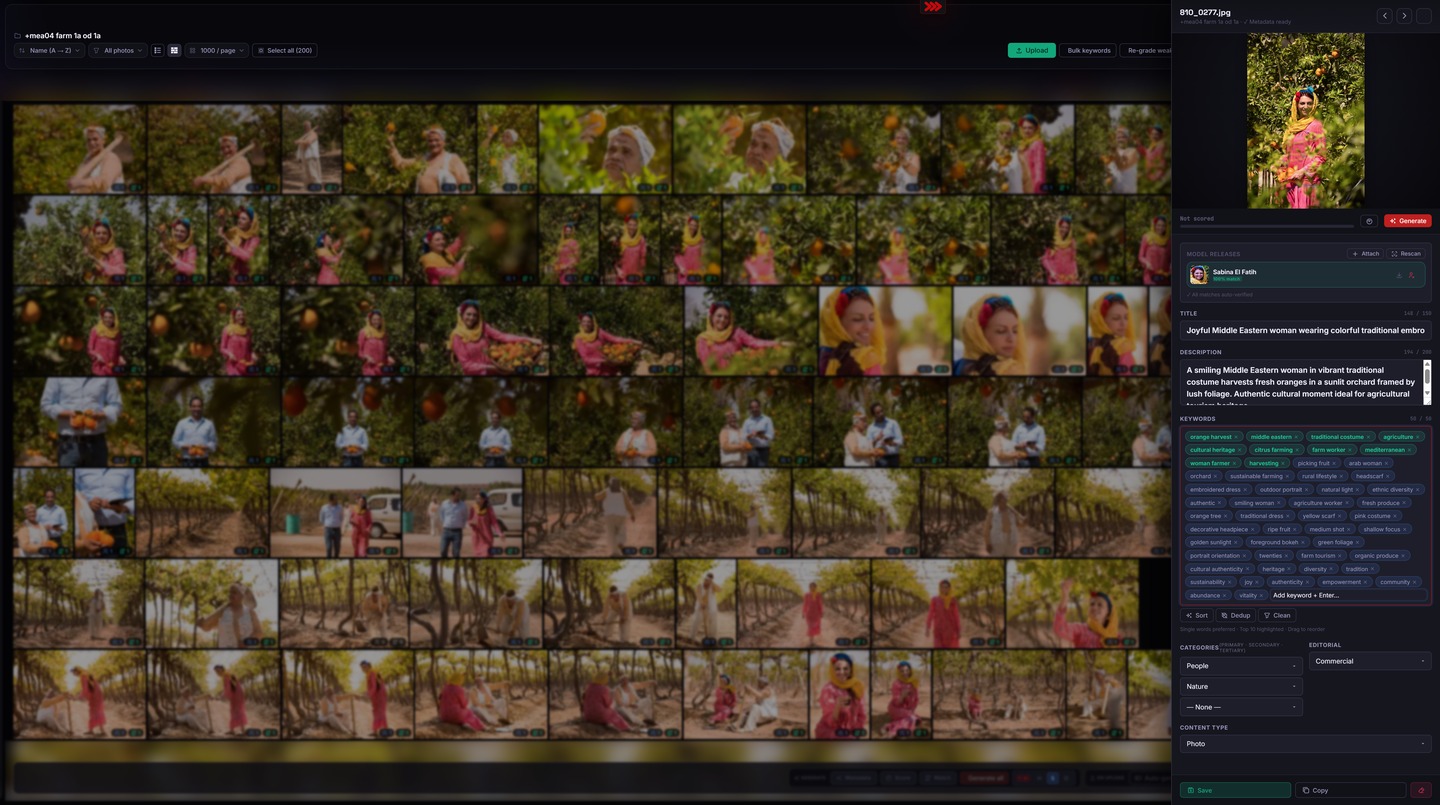
Works in the browser · no install · bring your Anthropic API key
Platform exports
Every major stock platform, shaped and ready.
Each agency uses different column names, keyword count limits and category taxonomies. The export engine shapes the same AI-generated metadata into a ready-to-import file for every platform — no manual reformatting.
Why format shaping matters: Shutterstock accepts up to 50 comma-separated keywords in a keywords column. Alamy wants a semicolon-separated supertag + keywords split. Getty/iStock requires a separate CategoriesIds numeric column and hard-caps at 45 keywords. Adobe Stock accepts 200-character descriptions. Generating once and pasting into five different spreadsheets manually costs 15–20 minutes per batch — the export engine does it in one click.
Embedded XMP written into JPEG and TIFF source files. Sidecar XMP for RAW, PNG and all other formats.
CSV export preview
What the Shutterstock export actually looks like.
This is an actual row from the .tag.shock Shutterstock export — the same row that imports directly into Shutterstock Contributor without any manual editing. Column order, keyword delimiter and category codes are all shaped per platform.
| Filename | Description | Keywords | Categories | Editorial | Mature | Illustration |
|---|---|---|---|---|---|---|
| 810_0277.jpg | Young woman picking oranges in a sun-lit Mediterranean grove — lifestyle harvest | orange, woman, harvest, lifestyle, citrus, Mediterranean, grove, picking, fruit, golden hour, traditional, authentic, agriculture, outdoors, nature, summer, seasonal, organic, food, farm, healthy, copy space, warm light, countryside, rural, smiling, happiness, vitality, young adult, female | People, Food and Drink | no | no | no |
Keywords shown truncated for display. The full export contains all 50 ranked keywords in priority order. Adobe Stock, Getty, Alamy and Pond5 exports use their own column schemas and category codes — shaped automatically by the export engine.
Built for photographers who sell at volume.
For microstock contributors and commercial studios preparing images for sale — anyone who keywords at volume, needs a scored submission queue, and has people in frame who need a release on file.
Microstock contributor
You shoot to sell. Your takes run to hundreds of frames and every one needs a title, 50 ranked keywords and a platform-ready CSV before it ships. .tag.shock turns that into a single reviewed pass — metadata, score and release check in one Generate call per image. Prompt caching means even a 200-image batch costs under a dollar in API fees.
200-image take: ~6 hr manual → ~40 min reviewed pass
Commercial photographer
You license commercially and stock is a side channel. The 9-axis sales score tells you exactly which frames are worth a submission slot — before you spend it. AI release matching confirms every face is cleared so your images don't come back rejected post-submission. One tool, both problems solved.
50-image selects: ~90 min manual → ~10 min scored queue
Multi-platform submitter
You submit to five or more agencies. Each has its own keyword limits, column format and category taxonomy. .tag.shock's agency-variant export produces ready-to-import CSVs for all of them from a single generation run — correctly shaped per platform, no reformatting, no copy-paste between spreadsheets.
5-platform CSV prep: ~45 min manual → 1 click, all formats
.tag.shock vs the alternatives
How does it compare to Xpiks, Microstock+, or doing it manually?
If you've searched "Xpiks alternative" or "Microstock+ review" here's an honest feature-by-feature comparison. .tag.shock is narrower in scope and deeper on AI — it doesn't manage your FTP uploads, but no other tool matches what it does with metadata quality and release verification.
| Feature | .tag.shock | Xpiks | Microstock+ | Manual |
|---|---|---|---|---|
| AI title + description | Claude Vision per image | Optional AI add-on | Basic AI suggestions | You write every line |
| Ranked keywords (50) | 4-tier commercial weighting | Flat list, no ranking | Flat list | Manual or copy-paste |
| 9-axis sales score | Yes — submission priority rank | No | No | No |
| AI model release matching | Face + back-of-body recognition | No | No | Manual check |
| Person recognition from behind | ArcFace + Claude Vision | No | No | No |
| 26 agency categories auto-mapped | Yes | Partial | Partial | Manual |
| Per-platform shaped CSV export | SS · Adobe · Getty · Alamy · Pond5 | Yes + FTP upload | SS + Adobe only | Manual formatting |
| Runs in the browser, no install | Yes — local-first | Desktop install required | Web app | Spreadsheet app |
| Cost per 200 images | ~$0.60 in API credits | $9–12/mo subscription | $12–19/mo subscription | ~6 hours of your time |
Xpiks and Microstock+ are established tools with broader upload-management features. Of the three, only .tag.shock ships AI release matching, scored prioritisation, and back-of-body person recognition. Use the right tool for the right job — or both.
Where .tag.shock fits in the .shock Suite.
Step 1
.cull.shock
Visual cull and score selection. GPU-accelerated, crash-safe. Sends selects directly to .tag.shock via BroadcastChannel.
Step 2
.release.shock
Collect, sign and archive model releases. Builds the face library that feeds AI release matching here.
Step 3 — you are here
.tag.shock
AI title, 50 ranked keywords, 9-axis sales score and model release matching in one Generate call. Exports shaped CSVs per agency.
Step 4
.publish.shock
Upload tagged, cleared images to all agencies from one queue. Reads the shaped CSVs .tag.shock produces. Coming soon.
.tag.shock runs after culling and release collection, before publishing — and works standalone too. Start here with finished JPEGs even if the rest of the pipeline isn't in play. Built in the spirit of tools like Xpiks and Microstock.plus; not affiliated with either.
What you get on each plan.
Common questions
Everything you need to know.
Do I need to sign up or install anything?
No sign-up required to use the Free local tier. Open .tag.shock in your browser, enter your Anthropic API key in Settings, and you're ready to drop in a folder. No software to install, no account to create. If you want cloud processing across devices, create a free account for the Starter plan. Paid plans add monthly cloud-run allocations so you don't need your own API key.
How much does it cost per image to run?
.tag.shock uses Anthropic's prompt caching. The system instructions (the keyword-generation prompt) are cached after the first image in a session — you only pay tokens for the image itself on every subsequent call. In practice: the first image costs roughly $0.006–$0.010 at current Claude Haiku pricing; each subsequent cached image costs roughly $0.002–$0.004. A 200-image batch typically costs well under $1 in API fees. The Free local face-matching modes (CLIP + landmark models) have zero API cost.
How long does a Generate call take?
A typical Generate call — title, description, 50 keywords, 9-axis score, categories and release status — returns in 10–30 seconds depending on image complexity and current API latency. The first call in a session may be slightly longer as the prompt cache is being populated; subsequent calls in the same session are typically under 15 seconds. Generate all processes images sequentially, so a 200-image folder takes approximately 30–50 minutes end to end.
Which image file formats are supported?
.tag.shock reads JPEG, TIFF, PNG and all major RAW formats natively: NEF (Nikon), ARW / SRF / SR2 (Sony), CR3 / CR2 (Canon), DNG (Adobe universal RAW), RAF (Fujifilm), ORF (Olympus), RW2 (Panasonic) and others. No pre-conversion to JPEG is needed. Embedded XMP is written back into JPEG and TIFF; sidecar XMP files are generated for RAW and PNG formats.
What exactly does .tag.shock generate for each image?
One Claude API call returns: a commercial title (up to 150 characters), a platform description (up to 200 characters), up to 50 ranked keywords in 4 priority tiers, up to 3 primary and 3 secondary submission categories, a content-type flag (Photo / Illustration / Vector / Video), the 9-axis commercial sales score with a written reasoning paragraph, and a model release status flag. All in a single structured response — no second API call, no extra latency.
How does the 4-tier keyword prioritisation work?
Claude ranks keywords into four tiers by commercial weight. Primary — the most specific, high-intent terms a buyer searches (e.g. "orange grove harvest"). Secondary — broader subject terms that widen reach (e.g. "citrus fruit", "agricultural landscape"). Supporting — descriptive context (e.g. "golden hour", "copy space", "Mediterranean"). Context — technical or supplementary tags (e.g. "horizontal", "colour", "outdoors"). The export places primary keywords at position 1 so agency ranking algorithms see the strongest signals first.
Which stock platforms does .tag.shock export for?
The standard export covers Shutterstock, Adobe Stock, Getty / iStock, Alamy, and Pond5. Each agency has different keyword count limits, category naming and column headers — the export engine shapes the metadata correctly for each platform so you import directly without manual editing. Embedded XMP is written to JPEG and TIFF source files; sidecar XMP is generated for all other formats including RAW.
What are the 9 axes in the sales score, and what does the score mean?
The 9 axes are: searchability, commercial relevance, emotional resonance, technical quality, authenticity, trend alignment, market saturation, usability and licensing risk. The overall score is a submission priority rank — it tells you which frames to upload first, not whether an image will pass or fail agency technical review. Re-grade any image after metadata edits; the score refreshes in one call without re-running the full keyword pipeline.
How does the smart model release matching work?
When you load a folder, face detection runs in parallel across all images — no separate trigger. In Free mode, on-device landmark models and CLIP cosine similarity compare each detected face to the release photos in .release.shock — zero API cost. In AI mode, a multi-stage pipeline runs: CLIP embedding match first, then Claude Vision verification for ambiguous or rear-view cases. Matched release names attach to the metadata and export in the submission CSV. Unmatched faces are flagged in the gallery before export.
Can .tag.shock match a model release when the person's face isn't visible?
Yes — in AI mode. When a subject is turned away, shot from behind, or has their face occluded, the detection pipeline flags the image as "person visible, face not detected" and routes it to Claude Vision with the body-based matching prompt. Claude analyses body shape, distinctive hairstyle, clothing, posture and contextual cues against the reference photos in your .release.shock library, returns a match confidence score and a written rationale. This is especially important for lifestyle, fashion and action photography where subjects are rarely front-facing. Matches below your configured confidence threshold land in a manual review queue — nothing ships unchecked. Free mode (on-device only) requires a visible face for geometric matching; AI mode is recommended for any shoot with rear-facing or occluded subjects.
What makes .tag.shock's AI prompts different from a generic "describe and keyword" call?
.tag.shock uses a structured three-layer prompt architecture built on microstock submission expertise. The metadata layer encodes keyword tier definitions, per-platform character limits, deduplication rules, singular/plural conventions and a 26-category taxonomy table — so the model produces agency-shaped output, not raw description. The scoring layer encodes the 9-axis rubric with weighted definitions and numeric anchors (what an 85 vs a 60 looks like on each axis), plus instructions to return a written reasoning paragraph alongside each score. The release matching layer provides a structured visual checklist including body-based identification cues for rear-facing subjects. All three layers are prompt-cached after the first image, so every subsequent image in a batch only pays tokens for the image itself — not for re-sending the instruction set.
Can I use .tag.shock without the rest of the .shock Suite?
Yes. .tag.shock works as a fully standalone stock photo keywording tool. Point it at finished JPEGs or TIFFs and run the full metadata generation, scoring and export workflow without any other Suite module installed. Release matching is optional — if you don't have .release.shock set up, .tag.shock still generates all metadata and scores, and flags images with detected but unmatched faces so you can attach releases manually.
What is the difference between v1 (local) and v2 cloud?
v1 runs in your browser using your Anthropic API key — all processing stays local, no files leave except the API call itself. v2 is a hosted cloud build currently in Early Access: files are processed on dotshock.ai infrastructure, results sync across devices, and there is no API key to manage. Both versions produce the same output. v2 adds team collaboration, shared project libraries and scheduled batch processing.
How is .tag.shock different from Xpiks or Microstock+?
The main differentiators are: (1) the 9-axis commercial sales score with a prioritised submission queue so you upload in order of likely return, (2) AI model release matching that confirms consent before export in the same workflow, and (3) batch cost efficiency — prompt caching means a 200-image folder costs under $1 in API fees. Xpiks and Microstock+ focus on metadata entry and platform sync; .tag.shock adds commercial assessment and consent management to the same single workflow. Built in the spirit of both tools; not affiliated with either.
Does it work offline?
The app shell and your previously loaded images work offline — you can browse your library, review existing results and edit metadata without a connection. Generate calls require internet access because they send the image to the Anthropic Claude API. The ArcFace local face-matching mode runs fully on-device and works offline; the Claude Vision verification step for release matching needs a connection. All data — your images, generated metadata and sales scores — stays in your browser's IndexedDB and is never uploaded to any dotshock server.
Can I use .tag.shock for video clips submitted to Pond5 or Shutterstock?
Not directly — .tag.shock generates metadata from still images. For video, extract a representative still frame (most video editors export a poster frame in one click), run it through .tag.shock to generate title, keywords and category, then copy the metadata to your video clip's submission form or CSV. The export columns for Pond5 and Shutterstock video share the same field names as the image exports, so the workflow is identical — you're just sourcing the frame manually. Native video support is on the v2 roadmap.
What happens if I run out of Anthropic API credits mid-batch?
The batch pauses and the failed image is flagged with an error badge. Any images already generated keep their metadata — progress is saved to IndexedDB after every successful call so nothing is lost. You can top up your Anthropic credits and resume from the first failed image; the batch picks up exactly where it left off. Prompt caching means re-running a flagged image after a credit top-up doesn't re-process images that already completed.
Can I edit the AI-generated keywords before exporting?
Yes — every field is editable before export. Click any keyword chip to remove it; type in the keyword field to add your own. The title and description fields are plain text inputs. You can also drag chips to reprioritise tier order, or use the bulk override to promote a keyword to primary tier across all images in a batch. Changes are saved automatically to IndexedDB; the export reflects whatever is in the editor at the time you click Export — not the original AI output.
v2 Cloud — Early Access
AI stock photo keywording, sales scoring and model release matching — in one call.
Part of the .shock Suite — one workflow from brief to paid. Free with your own Anthropic API key, available now.
v2 cloud mode is in Early Access — join now to shape the roadmap. Early Access members get cloud batch queues, team seats and priority support before general release.
Works in the browser · no install · bring your Anthropic API key · ~15 seconds per image